Rackabilly 2.0
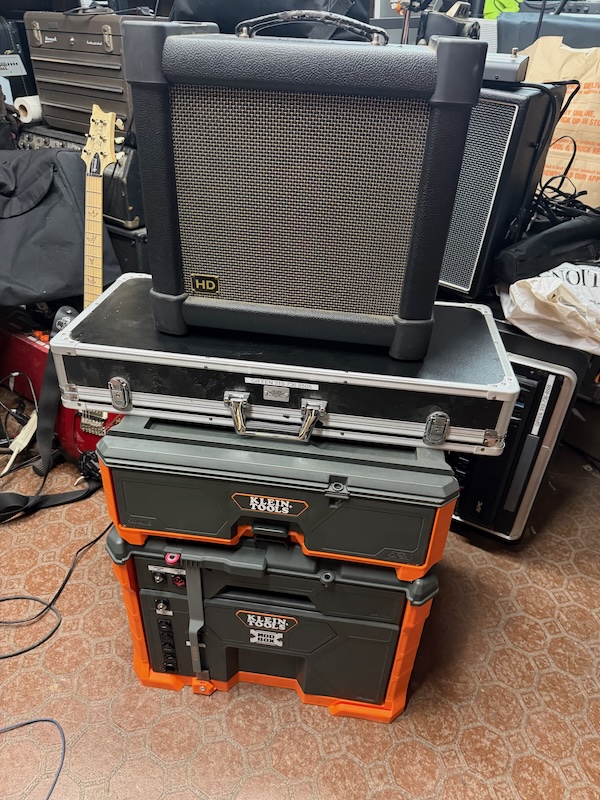
Toolboxes have evolved, so too, then, has the Rackabilly
(Rackabilly OG) ← Where it all began
October 11, 2026
I started writing this down before I started building this project, as there were a lot of details and a lot of planning that needed to happen in order to make it a successful build.
Background:
First, a little background. The Rackabilly, or Rackabilly OG, as I should probably start calling it, was an alternative approach to a pedalboard that I came up with about nine years ago. The idea was to reduce the required footprint on stage and put the bulky stuff, I.e., the pedals, power supply, and connections, back behind me by the amp. And though I didn’t have any guarantee that it would work, let alone sound good, until I had it built, as it turned out, it worked great, and sounded good. And its unique look has garnered more than its fair share of attention from other bands at showcase gigs, which is what The Boilermakers usually play.
But it’s heavy. And though it’s got a handle on it, it’s rough to lift, and putting wheels on it wouldn’t be practical.
And in the nine years since I built it, I’m now playing in different bands, with different pedals. Truth is, in my latest rig, I only use 3 actual “noisemakers,” as I call them, one pedal, a guitar processor, and a guitar synthesizer. And you’d think that would make for a small pedalboard footprint. But no. Though the three boxes are relatively small, I control them via MIDI, and that requires a few more boxes, and some more cables, and other stuff. So I ended up with a large Pedaltrain board, in a flight case, which is probably heavier, and definitely larger, than the Rackabilly OG was. And with my shoulder injury last year, followed by my re-injury this year, I really don’t want to keep lifting heavy stuff. So, what to do?
New Options:
Well, guitar technology has advanced quite a bit, and, so has toolbox technology. Several years ago, Milwaukee developed their modular toolbox system called Packout. The bottom box is on wheels and there are other units of different design that stack on top, latch together so they roll safely and easily, and make for an efficient system. Could I build something using that?
Well, the Packout system’s rolling bottom unit doesn’t have drawers, it opens from the top. And on a stage, that’ll be dark and more than a little cumbersome. And if you stack something on top of it, then you have to remove it just to open the bottom unit that you can’t see into. Not ideal. But the other tool manufacturers started coming out with their own versions of the stacking modular system. And though most of them don’t come with bottom units with drawers, two of them do. Toughbuilt’s StackTech and Klein’s ModBox systems have a bottom unit with two drawers. And I looked long and hard at both, and the Toughbuilt system had better features, but it’s bigger and appreciably heavier, bigger than I need. Klein’s is a little smaller, and noticeably lighter. So I went with that.
I started planning what would go in there. The bottom would hold the VG-800 (guitar processor) and GM-800 (guitar synth), the Boss GKC-AD converter that lets these two devices work with my GK-13-equipped guitars, the Nocturne Atomic Brain, a preamp that is part of the "secret" to my tone, the power supply (a Fender Engine Room), the Oscillator Devices Siren MIDI-controlled stereo volume control, a Voodoo Lab Control Switcher, a box I built to switch between the VG- and the GM-800 via MIDI, a MIDI Quadra Thru box, a Primova GKFX-1 subsonic filter, yeah, that’s probably it.
But this creates what has been the biggest challenge to date: If the VG and GM are in the big drawer, how can I read what’s on their displays? Since I use the tuner in the VG-800 to tune my guitars, I'm going to need it. How, indeed?
I thought there are two ways to do that: 1)Find an API for these devices and write a program that extracts it from the two devices, reformats it, and displays it in a tablet screen, or 2) The Old-Fashioned way, I.e., put a camera inside the box, focused on the two display screens and feed that to a small HD monitor mounted on the floorboard that will control everything in the toolbox. Given that the former was probably not even possible (if anyone knows otherwise, let me know), I started researching the latter. I tried shooting video of the devices’ screens with whatever camera I had around: a spare backup camera, a webcam, a cheap video surveillance camera from Amazon, my GoPro, and my iPhone. The iPhone seemed to be the only one that could capture a legible image. But mounting an iPhone inside the box and broadcasting a signal, even over a wired connection, to a display, and having that stay on for an entire gig wasn’t a good option. So I looked into the specs on the iPhone camera and looked for a standalone camera with the same ones. And the ones I found were expensive.
But I did find one (on Amazon, of course), that looked like it would do what I needed. A 4K video camera with zoom and adjustable exposure for $107 had me keeping my expectations in check, but stranger things have happened.
When I first shopped for these toolboxes, I figured the 2-drawer rolling box with a 2-drawer add-on box on top of it would be adequate for storage and for the components that needed to go into them. But once I got them and started loading stuff from my crate of gig stuff, I discovered I was going to need more space. So I got a single-drawer unit and stacked it in the middle underneath the 2-drawer unit. This gave me the space, but now it’s getting tall and heavy, probably now heavier than the original Rackabilly even without any of the components mounted in it. But at least it’s on wheels so it’ll be easier to move around. And, I realized I forgot to mention one element of the design: having the toolbox stack behind me creates a spot to put the speaker cabinet (and the amp head, a Quilter SuperBlock UK) will be inside the top drawer of the lower unit). Having to add the additional 2-drawer unit will put that speaker cab up pretty high, so I may have to pull that upper set of drawers off before using it on stage. We’ll see.
The camera arrived, well, actually 3 of them. One was designed to be an automotive backup camera, with navigation lines and a reversed image. Well, that one’s not going to work. Another one had infrared emitters and actually almost worked like I wanted it to, but didn’t have the right focal length to capture both screens at the same time. And one (the fancy 4K camera) worked just like I wanted it to, but is really big, and wouldn’t fit in the box the way I’d planned, but was sufficiently adjustable so that if I mounted it on the wall of the box and shot diagonally, and mount both devices at an angle, I should have been able to make it work. Needed an HDMI cable with a right-angle bend and a smaller head for all this to work, though. Got one, but even a right-angle HDMI cable wouldn’t fit in the drawer adequately, so I revisited the one camera with the infrared emitters that made it possible to read the displays. But it can’t zoom out at all, let alone far enough so that it could read both displays. But it can read one display pretty well, so why not get two cameras and put one on each display? Not a bad idea, they're only $12 apiece, but I only have one monitor, how is that going to work? Well, the cameras put out a composite video signal (they’re not HDMI), and I got a converter box that will take the camera output and convert it into an HDMI signal. OK, cool, but how do we get both cameras on one screen? A video mixer that does picture-in-picture and/or split-screen might do it, but those can be large and pricey, but maybe somebody makes a small one that only has two inputs and one output. And somebody in China does, and they sell them on eBay for less than $100 with shipping. Ordered it and hoped it worked.
It took several weeks to make the journey from overseas, but I finally got it, and though the manual was in Chinese, it was easy to figure out, and the Picture-in-Picture works great. But let’s recap how this is going to work: two little cameras, OK, those don’t take up too much space, but they each need 12 volts of DC power to work. No sweat, my Fender Engine Room LVL 12 power supply has two switchable ports that can be 9, 12, or 18 volts. Perfect! Set those two ports to 12VDC and hope 500 ma is enough to run the cameras. Needed a couple of polarity-reversing power cables, since guitar pedals are center-negative and the cameras are center-positive, but they’re all 2.1 mm in diameter so I’m not complaining. Spoiler alert: it works! So now I’ve got two cameras, that means two video converters, feeding the video mixer, so the two cameras, two converters, and the video mixer all have to go into that bottom drawer with all the other stuff. It’s going to be tighter than I wanted, and it will probably get hot in there, too. I’m NOT putting a cooling device in there.
Even though I do most of my gigging using a GK-equipped guitar, there are those times when I want to use an analog guitar or other amplified instrument. So I wanted to have a ¼” input jack on the front panel (front of the drawer) that I could send to my VG-800. The easiest way to do that is with one of my Primova GKFX-1 subsonic filters, which has an analog input it can “splice” into the GK signal. So I made another panel-mount ¼” jack with a short patch cable to the Primova. But it wasn’t adequately shielded and made a bunch of noise through the amp whenever I moved the drawer, so I decided to shield it. I had one more ABS box like the one the power inlet is mounted in (oops, that's farther down in this diatribe), so I lined the inside of it with copper foil, added a ground lead that goes to the ground lug on the jack, and strapped it in with a zip-tie. Not as pretty as I’d like, but does the job well. There’s another ¼” jack on the front for sending the output to an external amp instead of the one in the top drawer, and it’s switched so when a plug goes into it, it disconnects the Quilter SuperBlock in the drawer. I didn’t shield it, but it isn’t noisy, so as long as it stays that way, I’m leaving it that way.
Other fun stuff I had to figure out included deciding what goes into the toolbox, and what goes into the floorboard. And it turned out that I needed to put my Morningstar MC-8 Pro MIDI controller, my two Luminite Graviton M1 MIDI controllers, 2 footswitches and 2 expression pedals, a stand for the little monitor, the little monitor, a clock (for identifying when break time is), and a MIDI Solutions MIDI merger to accommodate all the MIDI stuff that board will be transmitting back to the toolbox. I wanted to power everything separately from the floor board, so as not to have to run an AC cord from the front of the stage. And I figured out how to do it, but that meant I will have to build a snake with 5 cables in it: one for MIDI, one for HDMI, one for USB (to power the monitor and the clock, and maybe charge my phone in a pinch), one high-current 9VDC cable to power the MC-8 Pro and the two Luminites (those three draw 1,000 milliamps all together, so to do it with one cable, I had to use a current-doubling cable and use 2 ports on the Fender Engine Room), and then a CAT6 cable which will be used to control the LEDs next to the footswitches (the necessity for which will be explained a little later on).
I also had to figure out how the MIDI cable routing would work. Spent some time with pencil and paper trying to figure out how to do that without creating loops or dead ends.
Same Controls:
I controlled the pedalboard in its old configuration using my iPad and a MIDI controller app called MIDI Designer Pro. And it works with the new Rackabilly as well.
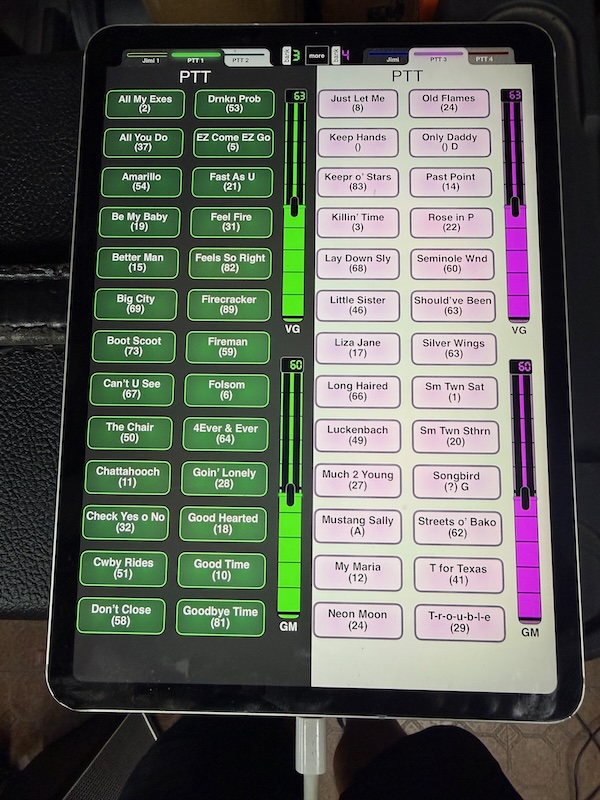
Each button on the screen activates a preset on one of the Luminite Graviton 1 controllers, and that preset squirts out all the necessary MIDI commands to the appropriate devices to bring up the correct settings on the VG-800 and/or GM-800 for that particular song. I have the set lists for the bands I play with most often on here, and another set of pages of different generic presets I use often, like clean electric guitar, overdriven electric guitar, acoustic guitar, 12-string guitars, drop- or altered tunings, pianos, fiddles, accordions, etc. Since I have to get ready for a song pretty quickly once the bandleader calls it, this saves me a lot of time. I also use OnSong, which not only displays lyrics and chords, but also sends MIDI commands whenever you bring up a song. So if someone requests a song, and it's one I know, I can just quickly pull it up and go.
Construction Begins:
I had originally envisioned using a pedalboard I had lying around on which to mount all the MIDI controller devices. But once I started laying them out, I discovered they weren’t going to fit. But I have another one, it’s wider and not as deep, and everything will fit on it so that’s what I went with. It looks like this:
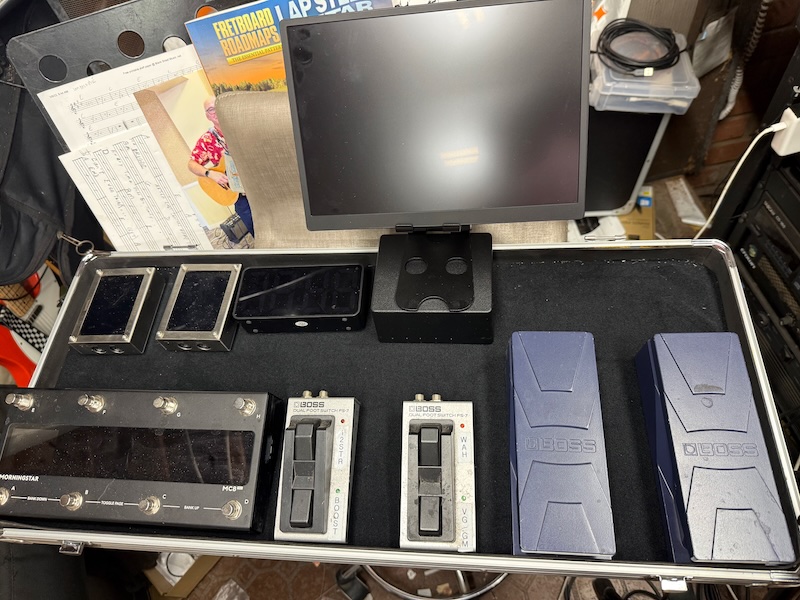
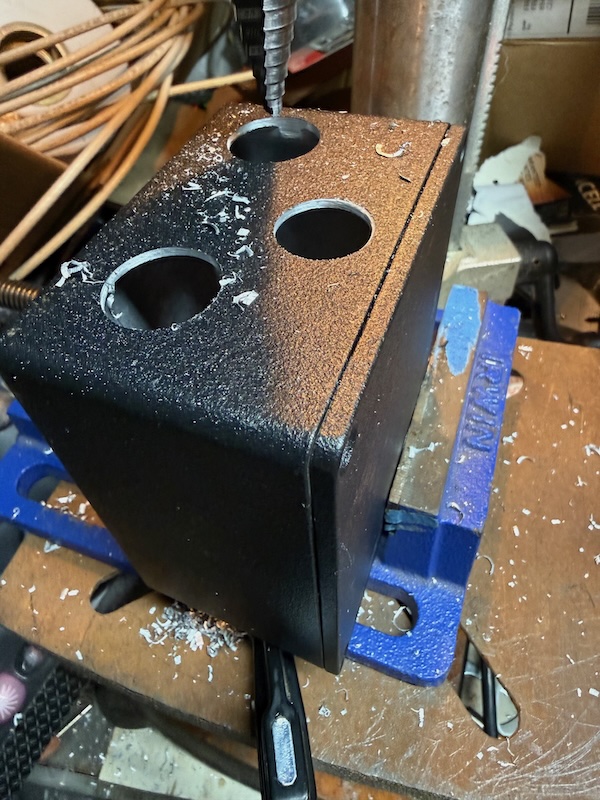
But to make this work neatly and reliably, and more importantly, to reduce the wear and tear on the jacks on the actual devices caused by frequent plugging and unplugging, I’ll need a central “jack box” on the board to plug the five different cables (MIDI, CAT6 (which will provide both switching and 9V power to the LEDs), high-current 9VDC, USB (to power the monitor and clock), and HDMI) into. Since none of these carries an audio signal, and the power is all DC, I’m not expecting any noise issues. In order to prop up the monitor so I can see it on stage, I ordered a little, adjustable tablet stand, one that collapses for load-out. Hopefully that will work (spoiler alert #2: It does!). The Jack Box (maybe I should call it “Jacks in a Box” and put a Monster Taco (the holy grail of post-gig sustenance) sticker on it) will have 5 2.1mm power jacks, one each to provide enough power to run the MC-8 Pro, two Luminite Graviton M1s, and the two FS-7s. I bought some MIDI jacks to make a “pass-through” MIDI connection. Unfortunately, I didn’t look closely at the specs and the jacks are PCB mount and not solder lugs, so soldering those little CAT6 wires onto the jacks’ tiny little pins was a royal pain in the ass. The LEDs that go next to the FS-7s are an unfortunate necessity, brought about by a limitation in how they work with the MC-8 Pro. It’s a long story, but I need to know when an effect is on and when it’s off, and to work with the MC-8 Pro, the FS-7s need to be in Momentary mode, which means their built-in LEDs won’t do the job I need them to, so putting LEDs next to the FS-7s that stay on while the pedal’s function is active and turn off when it is turned off gets around that. How, you ask? That’s what the Voodoo Lab Control Switcher is for: using MIDI commads to turn LEDs on and off. I decided to use two 3.5mm TRS jacks and plugs to connect the two boxes with the LEDs in them, to save space. The LEDs are yellow and blue, because those were the only colors I had on hand in quantities of 2. I found a red one and put that on top of the box so I’ll know when power is and isn’t going to the box. The HDMI and USB jacks are just pass-throughs with little patch cables inside the box. Here's the Jacks in a Box under construction:
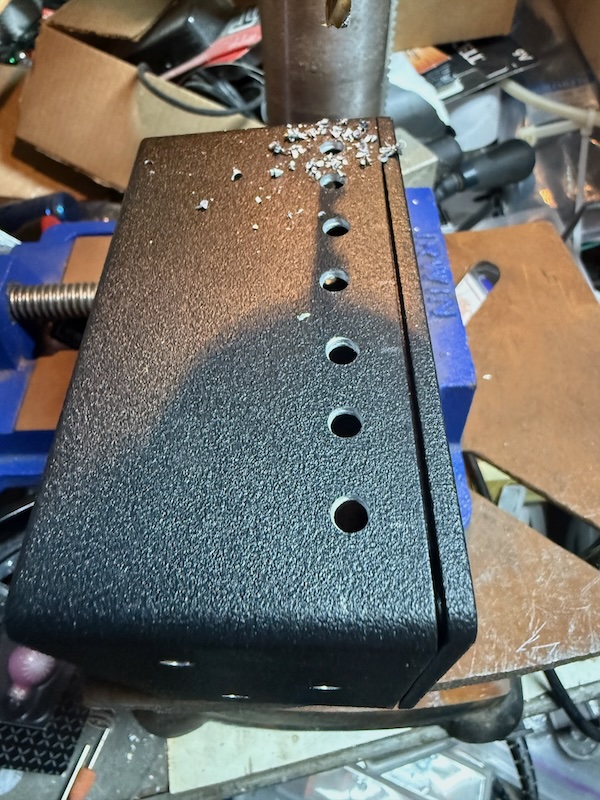
The Jacks in a Box connects to the toolbox via a 5-cable snake I made (again, USB, CAT6, MIDI, HDMI, and 2.1mm 9VDC cables, each 20 feet long). Fun fact: the 9VDC cable is a power cable for a StarLink system, and I found one that was 20 feet long). The other end of the snake goes into 5 panel-mount connectors mounted vertically (the only way they’d all fit) on the front of the toolbox. The snake has a hanger hook for strain relief that conveniently hangs on a removable ModBox hook that mounts on the side. During construction, I had the toolbox up on a table and all the cables connected and dangling to the floor. None of them ever came loose, but no need to take chances. There are some more jacks on the front of the toolbox and the upper drawer, but more on that later. Once the floorboard was cabled, it looked like this:
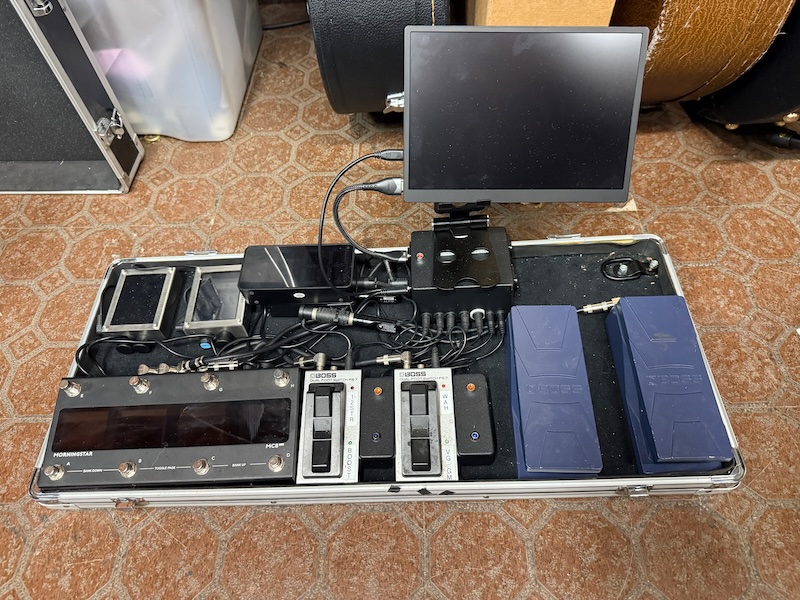
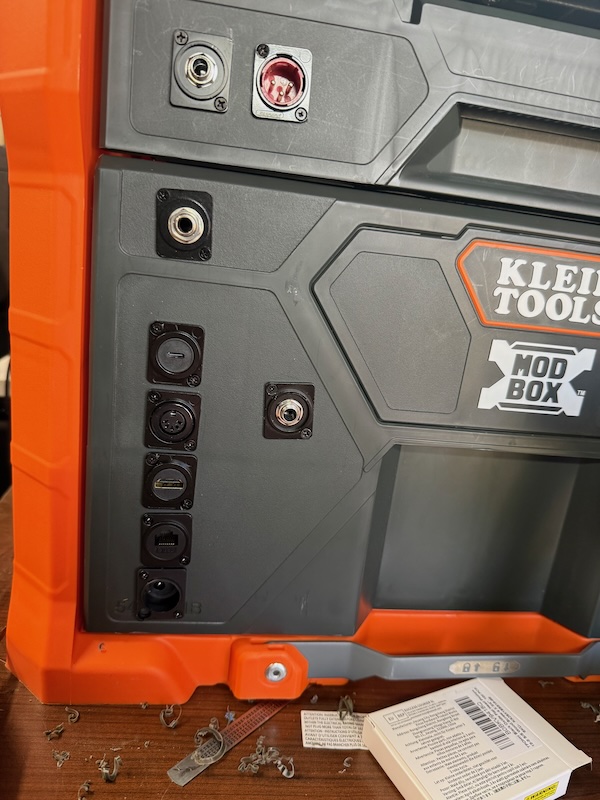
None of this will work without power, and while there’s a big Fender pedal power supply in there along with the amp’s (I did mention this setup includes the amp, right?) power supply and the two power adapters for the VG-800 and GM-800, AC power needs to get into the toolbox and to the power strip (also inside the bottom drawer) those are all plugged into. When I built the original Rackabilly, I flush-mounted an IEC inlet onto the back of that toolbox, and cut a big notch in the back of the middle drawer to accommodate the length of AC cord necessary inside the box to allow the middle drawer to open and close somewhat normally. But I didn’t think to use an AC inlet with an on/off switch and a fuse, which would have been safer and more practical. But for this build, I wanted that kind of power inlet. However, there really wasn’t enough room in the gap between the back of the toolbox and the back of the bottom drawer when it’s closed to accommodate that, so after a little thought, I opted to use a surface-mount ABS plastic box and mount the inlet on that, then screw it into the back of the toolbox, passing only the AC cord into the box an on into the drawer. I got lucky in that the extra length of cord that allows this drawer to open and close normally fits neatly in that aforementioned gap. The ABS box should have been easy, and the switchable inlet was designed to use crimp-on quick-disconnect lugs, which would have facilitated replacing it if I ever needed to. However, there wasn’t enough room in that little box to use crimp-on lugs, so I had to solder it (yes, I cut the regular plug off the power strip and shortened the cord to make it fit). And soldering it in meant doing it while the cable was hanging out of the toolbox. Not my neatest work. But wait, there’s more: I cut a hole in the top of the ABS box to mount the inlet into, and it wasn’t tight enough for my liking, so I glued the inlet into it with some super glue gel. What I didn’t know until I did it was that our beloved cyanoacrylate super glue reacted with the plastic that both the box and the inlet are made out of, and sorta melted it all together. And caused the switch to not work anymore. Oy. So I chiseled the old inlet out, somehow without breaking the ABS box lid, and (I’d bought a 5-pack of these fused, switched IEC inlets some time ago, I think when I bult the Sawzall reverb) put another one in, not glued until I find a more suitable adhesive. I thought these inlets were cool because the switch illuminates when there is power going through it. Unfortunately, and maybe that’s the reason they didn’t cost much, they illuminate whether the switch is on or off. Not quite what I had in mind, but the power is both switchable and fused. The power strip has a switch and circuit breaker on it, too, but they’re a lot harder to reach inside the box.
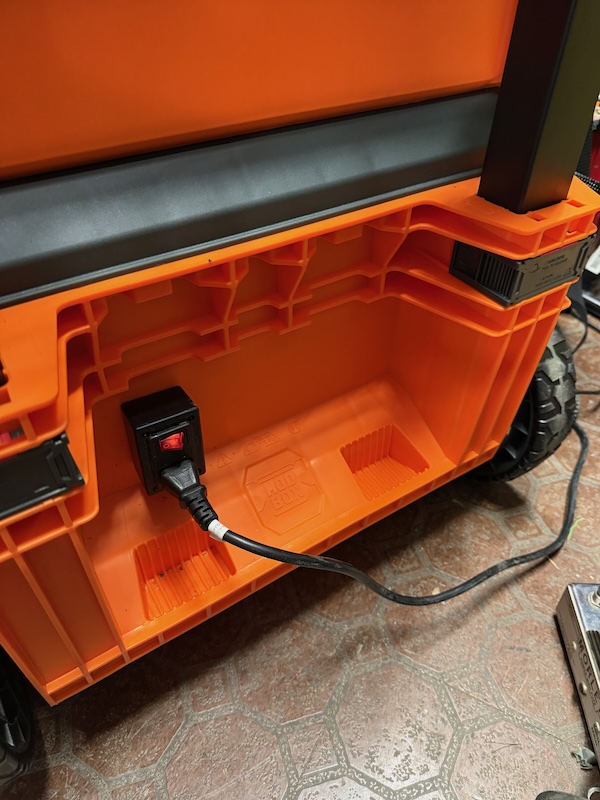
Eventually I got it wired, and tested successfully. Didn’t intend to spend that much time on that part of the process, but that’s how it goes sometimes.
Running the audio cables to the various devices inside the toolbox:
- Boss VG-800
- Boss GM-800
- Oscillator Devices Siren pedal (MIDI-controlled stereo volume control)
- Output Switcher (a box I built to switch the system’s feed to the amp from VG-800 to GM-800 and back again as needed via MIDI)
- Nocturne Atomic Brain pedal (in the VG-800’s effects loop)
was fairly straightforward, though the cables take a serpentine route around the perimeter of the inside of the toolbox (one aesthetic advantage the Rackabilly OG had was that most of the cabling was out of sight behind the toolbox drawers). The initial proof-of-concept setup was more cluttered than even I had imagined, but if I had put everything in there neatly and hadn’t cabled everything correctly (which happened; I miscabled one device, but didn't do any damage, thankfully), I would’ve had to rip some of it out and redo it. I also had to make a couple of GK Serial cables, to go between the GKC-AD and the VG-800, and from the VG-800 to the GM-800. They're like TRS audio cables but use special 3-conductor cabling with extra shielding, like a DMX cable.
Then there were all the MIDI cables:
- From the front pass-through jack to the MIDI Quadra Thru
- From the Quadra Thru to the Control Switcher
- From the Control Switcher to the Siren pedal (I didn't have one long enough to reach it from the Quadra Thru)
- From the Quadra Thru to the VG-800
- From the Quadra Thru to the GM-800
At least I didn't have to make those, just had to order what I didn't have and squeeze them in. By the time the pedals, cameras, peripherals, and cables were in, it looked like this:
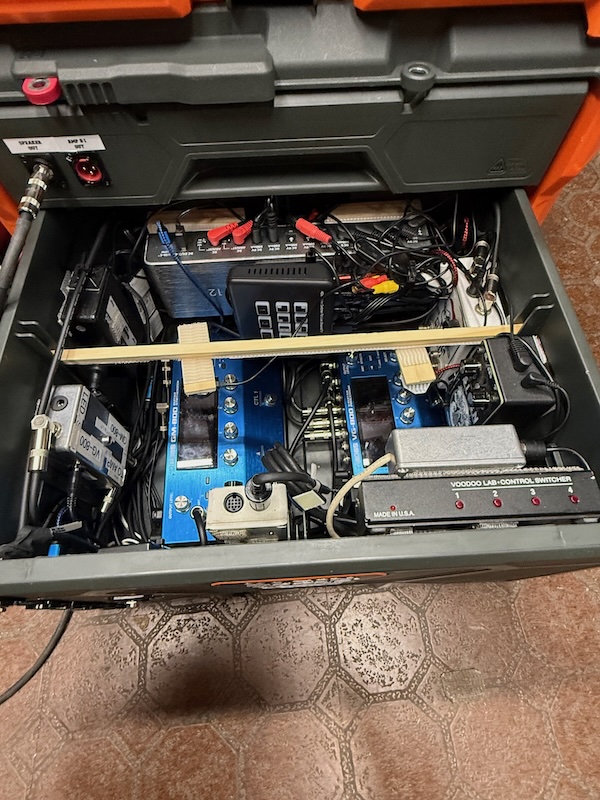
Wired up the Jacks in a Box, and cabled everything correctly (or so I thought), so it was time for a “smoke test” (a term I learned from my dad that refers to the first time you hit the power switch on something you built; he built a lot of cool stuff in his lifetime and while he may not have coined the term, I’ll bet that name was accurate at least once). Plugged everything in, Plugged in the power cord. Pushed the power inlet switch. Most everything lit up. Heard the little pop in the speaker when the amplifier comes on. Pushed a few buttons. All the LEDs lit up, but not when they were supposed to. OK, I’ll troubleshoot that first. Expression pedals weren’t expressioning. But the MC-8 Pro looked normal. Hmm, OK, need to look into that. The clock and the monitor didn’t light up (that was one of the easiest parts of the whole thing). Brushed the strings on the guitar. No sound. Hmmm. Connected my iPad to the Yamaha Bluetooth MIDI interface. Sent a command to the MC-8 Pro. It worked! Sent another to the Luminites. They worked! Pressed a button on the MC-8 Pro to see if it scrolled the lyrics on the iPad. It worked! OK, so the MIDI stuff works, at least. That’s encouraging.
Troubleshooting:
OK, started with the USB power, or lack thereof. There was power from the source (I checked by plugging my phone into the various USB connections along the route), which is the USB C port on the Fender power supply. The cable from the power supply to the first pass-through was good. The power from the pass-though was good. The power from the 20-foot cable was good. But when I plugged that into the Jacks in a Box, no power came out of it. Opened the Jacks in a Box and checked the little cable inside that connects the two pass-throughs, it looked OK. Pulled one end of it off and tested the cable. No power. Hmmm. Thought maybe the USB pass-through was bad. Got out another pass-through (I had a spare). The 20-foot USB cable would power my phone but when I tried either the installed or the spare pass-through, it wasn’t passing any power through. Were they defective? Getting mildly desperate, I flipped the USB C connector over and tried it. It worked! Huh? That’s what I get for buying components on Amazon. USB to them must stand for “Unpredictable Serial Bus.” Tried plugging the cable into the Jacks in a Box again, this time with the connector flipped over, and the clock and monitor lit up. OK, issue resolved, but not in a way I felt good about. My workaround is to try to remember that if I plug one end of the 20-ft USB-C cable with its label facing up, I need to plug the other end in with its label facing down, or vice versa. Bigger fish to fry, on to the next one.
The LEDs next to the FS-7 footswitches are supposed to light up when you press the switch, and turn off when you press them again. And they did, but not quite correctly. Step on switch 1, and LED 3 turned on (and off). Step on switch 3, and LED 1 turned on. The LEDs on switches 2 and 4 worked liked they should. With 2 and 4 being correct, I guess you’d call this a backbeat issue. Needed to swap two connections inside the Jacks in a Box, and that problem was fixed. Now why weren’t the expression pedals changing the volume and doing the other things they’re supposed to? Did I plug them into the footswitch jacks on the MC-8 Pro and the footswitches into the expression pedal jacks? Yes. Is fixing it just moving the cables? No. I had custom-made the cables and they wouldn’t reach. So I reprogrammed the MC-8 Pro and recalibrated the pedals, all better now. All lit up like Christmas:
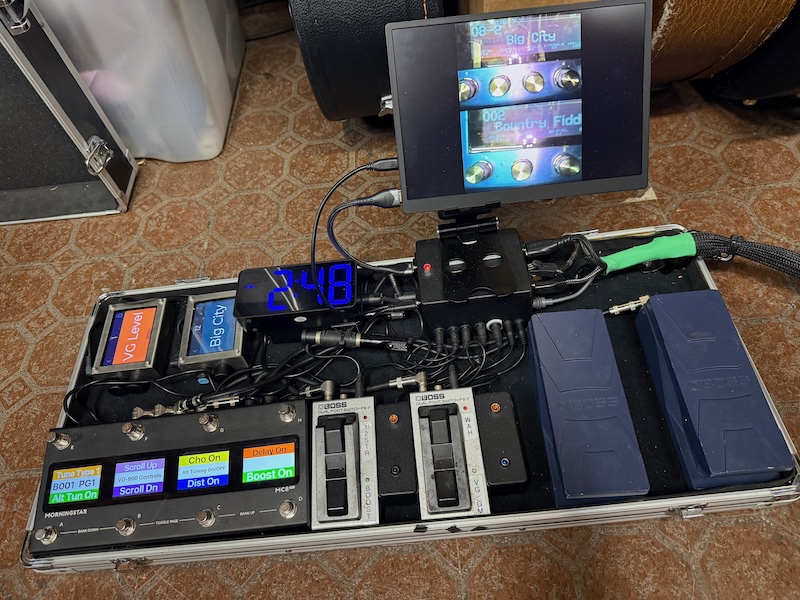
Now about the no-sound-coming-out…. That’s kind of a show-stopper. Could I have possibly plugged the audio cables in wrong? Yes. I somehow forgot that input is on the right and output is on the left. And since it was the Siren (stereo) pedal, I did it twice. That was an easy fix. Sound came out. Yay! But the guitar sounded bad. Well, let’s take a look at the amp. Gain way up, Master down, not what I’d had in mind. That helped, but still sounded thin and tinny. Checked the output setting on the VG-800, it was set to Line/Headphones. That works fine on my IK Tonex Cab, but not so much on this amp. This amp is a Quilter SuperBlock UK. I really like its tone and opted to use it as an onboard amp for this rig. If I don't feel it's loud enough, I may swap it out for my Quilter ToneBlock 202 if it will fit in the drawer. That could get loud. They both have a convenient DI out, which I patched through to a pass-through jack on the front of the top drawer of the toolbox, which is where the amp is mounted. I changed the VG’s output to “Combo amp 1x12” and it sounded just like it’s supposed to. I probably ought to neaten up and secure that power cord to the amp head. But I'll wait until I decide which amp head I'm going to keep in there permanently.
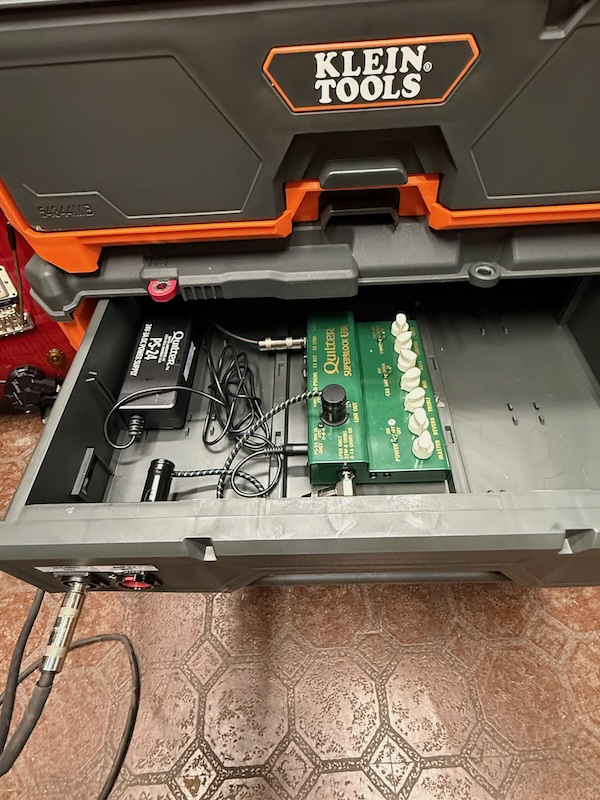
Neatened up the cabling inside the toolbox somewhat, it’s never going to look immaculate, but then, neither is my playing, and it somehow looks more hillbilly this way. While waiting for the snakeskin sheathing to arrive, I took the cables that will go into the snake out and unfurled them in the driveway, letting them warm up and straighten out, which will facilitate shoehorning them into that sheathing. Needed a couple of short HDMI cables for the cameras, and some male-to-male RCA plug adapters, all that stuff arrived the same day. Both the camera and the HDMI converter have female connectors, and the only way to make them talk to one another is to use these adapters. Once those arrived I put the camera setup together and tried to make it work. Since the VG-800 and GM-800 are on the bottom of the drawer with their displays facing up, the cameras need to hover over them, facing down. How to suspend them? After thinking about it for a long, long time, I concluded the most practical way to do it would be to put a rod or a stick across the middle of the drawer and mount the cameras underneath it. A 3/8” square dowel (if "square dowel" is not an oxymoron) fit snugly into the slots that are molded into the drawer to hold the dividers that I'm not using. If I mount some Dual Lock on its underside, and put some Dual Lock on the backs of the cameras, they could stick there fairly sturdily (the cameras are tiny and their connectors could be mounted elsewhere. I might have to add some stand-offs to get each camera in the right position, but I thought it would work. I was kinda counting on it. But at that point, it was all speculation because the necessary parts hadn’t arrived yet. But they did get here, and, best of all, it worked! I did end up needing some stand-offs, or offsets, to get the cameras in the right positions, but I can see the VG-800 and GM-800 displays on the little monitor now.
I shoehorned the camera cables, HDMI converters and cables, and the video mixer into the drawer, mounted atop the Fender Engine Room. But more importantly, it still works! Took a while to optimize the camera positions and adjust the display contrast so it’s most legible, and I used a couple of pieces of paint stirrer stick (unused) covered both sides with Dual Lock (now called "Scotch Mount Extreme," but the name change is so new it's not showing up on 3M's website yet) for those stand-offs/offsets. That way I could adjust each camera’s X and Y position for optimal display visibility. I was so excited when I saw that the video mixer worked just like it is supposed to. For $12 cameras, they capture a pretty good image in low light, probably thanks to those little infrared emitters around the camera lens. Positioning the cameras so those emitters don't obliterate the view of the display takes a little effort.
The Snake:
Wasn’t sure what was to come next, but since I now had the snakeskin cable sheathing, I tackled that. The cables were more supple after being stretched out in the sun, so that helped with the next step. Stuffed them into the sheathing and got them positioned where they need to be. The only downside to having a snake with 5 cables in it is that at 20 feet long, it gets a little heavy. And only the connectors on the front of the box are holding them in. So a little strain relief is in order.
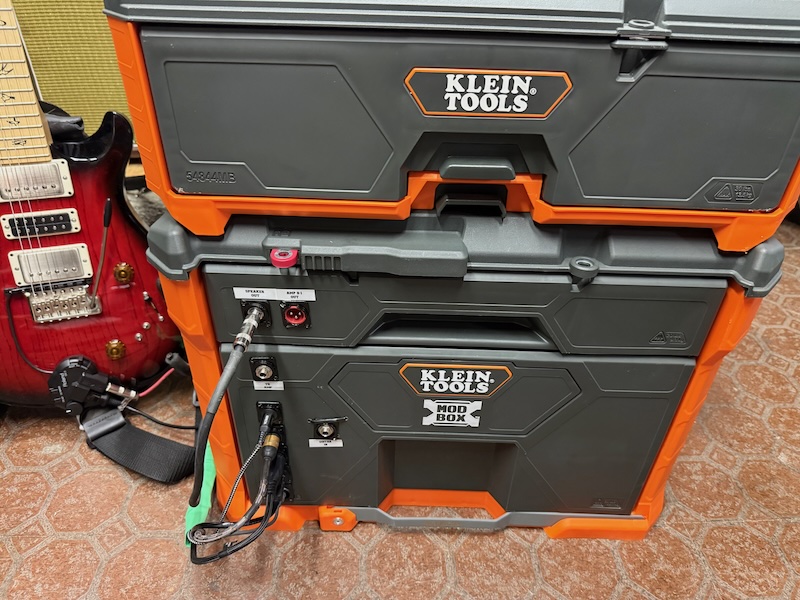
Essential Accessories:
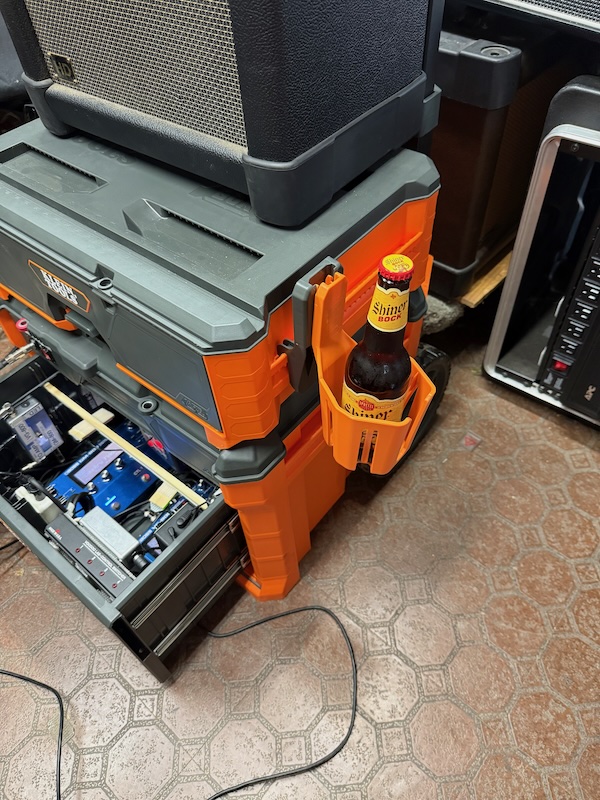
When I bought the ModBox, I bought a couple of accessories, the swiveling cup holder that removably mounts on the side (the necessity of this should be obvious):
and a couple of similarly removable hooks. I will use one as a hanger for my “Oh Shit” cable, a spare that I probably won’t need, unless I don’t have it. Might use it for a spare XLR cable, too. I can also hang my guitar stands on it for load-in and load-out. The other one will hold the strain relief loop I mounted near the end of the snake. By hanging on this, if someone trips over the snake, things are less likely to get inadvertently disconnected. I used a loop-end stainless-steel wire rope, strapping the loops against the snake and making a larger loop near the end to hang on that ModBox hook. Zip-tied together and protected with some heat-shrink tubing, it should be safe and secure. I’m sure I have some black heat-shrink tubing somewhere, but all I could find in this size was bright green. I’ll change it when I find the black stuff. Compared to the work involved in the rest of this, re-doing heat-shrink is pretty easy. That takes care of one end of the snake. The other end, that connects to the floorboard, needs a slightly different approach. I zip-tied a carabiner to that end of the snake, and mounted a D-ring on the top of the pedalboard, to hook the carabiner into and minimize the chances of having the cables getting yanked out if someone (like me) trips over them.
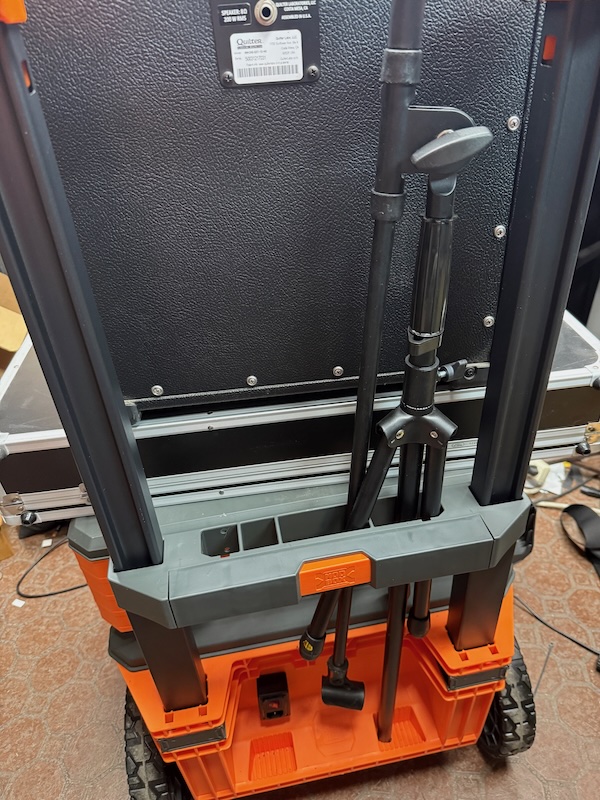
One of the more cumbersome and irritating aspects of loading in and out is carrying all the big heavy stuff along with something fairly awkward like a microphone stand. One feature of the ModBox is that there is a place to put long, thin objects (like a carpenter's level) into a slot near the handle. If I fold up my mic stand by pushing the legs as far up as they'll go, it fits neatly and securely into the ModBox rig:
It's Always Something:
We’re getting down to the end of the project, but there’s one bit that’s rather critical, and I couldn't figure out how to achieve it by myself. I need to be able to plug my 13-pin GK cable from my guitar into the front of the big drawer on the toolbox, and female GK jacks are hard to come by. Well, panel-mount GK pass-through assemblies are real hard to come by, and that’s what I really needed. After wasting time and effort trying to find a solution on ebay (helpful hint: those cables look like they’ll work, but they don’t; they weren’t designed for this application and the pinout isn’t correct). But thanks to the vguitarforums.com website, I found Synth Linx, a guy in Australia who custom-makes cables and adapters like this. They don't have a website, but if you email info@synth-linx.com they'll get right back to you. Wish I’d thought of looking there first. I reached out and described what I needed, and Peter at Synth-Linx responded quickly despite the time difference and just needed to know how long I wanted the cable to be and what my shipping address was (I did some metric conversion to express the cable length in centimeters, ‘cause that’s the kinda guy I am). It’ll still be a week or so before I get that last part, but I know it’s going to work, and once factoring in shipping, customs, and tariffs, it won’t be cheap, but compared to what I’ve spent on this project so far, it’s not that much incremental outlay. Looking forward to receiving this and finishing the project for good. In the meantime, I can still use the new Rackabilly 2.0, I just need to keep the drawer open slightly to plug in the cable.
I ran through all the songs I typically play with this rig, and almost everything worked like it should. My GM-800 had one “scene” a.k.a., preset, which got corrupted, or at least confused. It’s a re-creation of a GR-55 patch called “Dire Organ,” which emulated a Vox Continental organ like Augie Meyers used in the Texas Tornados, and Dire Straits used in “Walk of Life.” It changed to a different kind of organ sound, and I couldn’t get it to do anything else. I gave up trying to fix it and just reset the Scene from the control panel on the unit, then built a new one, problem solved. It now does everything I want it to. Woo-hoo!
Besides the GK jack assembly, about all I have to do is road-test it. Road-testing will involve packing it up, rolling it out to the van, and driving it around a bit, then bringing it back and setting it up to see if all the solder joints held. Hopefully they will, because I have a gig that'll need this rig next Saturday.
Update:
October 13, 2026
Took it for a road test, and it survived nicely, which was a relief. Drove it to a rehearsal across town and back with it bouncing around in the back of the van, and one or two things needed to be re-secured, but all the functionality came through fine.
One thing I did realize though, was that although the SuperBlock amp had enough power and volume for solo use, in a band context, I was concerned it might not be enough without plugging it into the PA, which isn't always an option. I have a Quilter ToneBlock 202 head that I thought might be a good replacement, it will have plenty of clean headroom, which the synthesizer will like better. But that head was in a cabinet at the home of the person whose house we rehearse in, so I had to wait until yesterday to get it, but I got it. And thankfully, it's not too big to fit in the amp drawer. But I had made the input, speaker, and DI cables to fit the SuperBlock, and they wouldn't reach the TB202 with the controls in an easy-to-use location, so I had to redo them a little. I had made a straight patch cable that went from the Output Switcher box in the bottom drawer to the guitar input on the SuperBlock, and I had to either replace it with a new one or find another approach. I opted for the latter, because who knows what kind of amp I'll want to put in there in the future, so I converted that plug into a jack in a little Hammond box I'd bought long ago and never used (and subsequently forgot about). Then I made another short patch cable to go from the jack to the guitar input on the TB202. If I ever get another amp head that the new patch cable won't reach, I'll just need to find or make another patch cable of the right length. Got it all installed and everything worked like it was supposed to. So far, so good.
Then I encountered another issue. I thought using a current-doubling cable would provide enough power to run the two Luminite Gravitons and the MC-8 Pro, and in theory, it would. But that doesn't mean it would provide enough current to handle the 3 devices starting up all at once, with their Inrush Current being somewhat greater than their operating current. And the Luminites boot up faster, so they were usually OK, but the MC-8 Pro would usually crash while trying to boot. I had forgotten about Inrush Current, and that was coming back to bite me. So I happened to have a spare 2-amp Boss power supply for the VG- and/or GM-800, and there was room for that in the bottom drawer, so I thought I'd had my issue resolved, until it came time to plug that new power supply into AC current. And all the available outlets on the power strip were in use or inaccessible. But, lucky me, I had a solution on hand. The reason I had that spare Boss power supply was that a while back I was building a small pedalboard with a second VG-800 on it, and thought I'd need 2 power supplies, and I thought two of these Boss PSB-1Us would work well and look neater, stacked on top of each other. But I ended up not needing that second power supply and kept it as a spare. In order to facilitate powering those two units with one cable, I bought an IEC 320 C8-to-dual-C7 "Y" cable, which I also didn't use. Until now. Piggybacked the second power supply onto the AC cord for the first one, and everything lit right up. Having twice the available current to operate the 3 devices seems like enough. But though it's certainly enough to run them, what if the Inrush Current of all 3 devices combined is greater than 2 amps? Well, I guess I could build a little power-on sequencer that turns each unit on separately, a few seconds apart. Not a bad idea at all, but I think I'll wait until I know I need it. The components exist, I'll just need to take the initiative. Maybe later.
Update 2: The First Gig
October 17, 2026
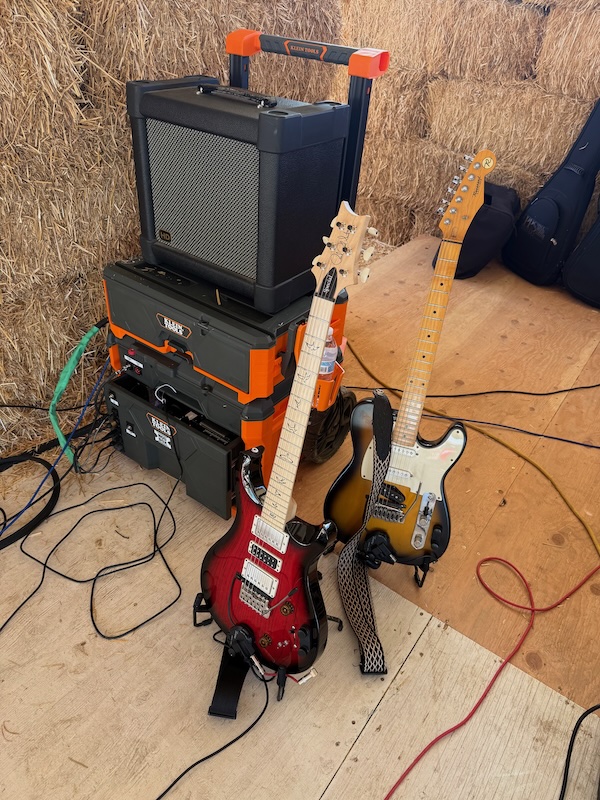
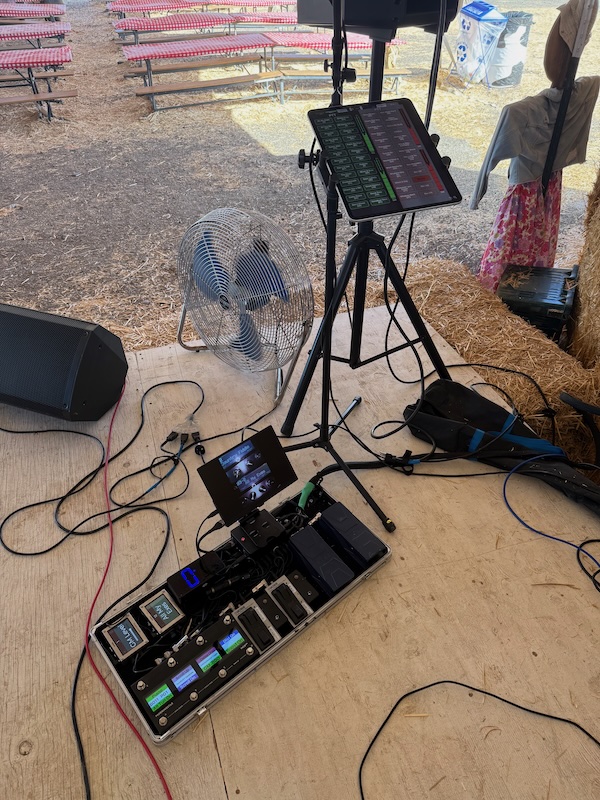
I took the new Rackabilly 2.0 to its first gig today to really test it and work out, or at least identify, any issues. And I found a couple. It was an outdoor gig in a dusty environment (a pumpkin patch), so I figured it would be a good “torture test.” It turned out to be a bigger torture test than I could have imagined. We were under a big, open-sided tent, on a stage made of plywood-covered hay bales, which moved a little under our feet, the hay bales shed a lot of hay all over our gear, the temperature was just over 100 degrees, and then the wind would occasionally gust up and blow dust all over (I almost lost my hat a couple of times). When I set it up, everything looked and sounded fine, which made me very happy. And the first set went OK, but I noticed, especially on the synth tones, the sound was a little crunchy. Checked the amp in between songs and discovered that was my error. I had the Drive up too high and the wattage (master volume) on the Tone Block too low. Easy fix, but it pointed up the first issue. I tried to pull the amp drawer open, but it got stuck about 1/3 of the way out. There’s not much in that drawer, so I was puzzled as to what was causing it. If the amp head had come loose from its mount (I didn’t have it stuck down too firmly because by the time I got to that step I was running low on Dual Lock and only used a few small pieces), and tilted on one side, the corner of it might have stuck up enough to catch on the upper part of the drawer jamb and stopped it from opening. But it didn’t look like it had come off its mount. So I tried to close it and re-open it, but now it wouldn’t shut all the way. Oy. OK, I pulled out the bottom drawer some more and tried it again. Stil no luck. I think it’s the patch cable that runs from the output switcher in the bottom drawer to the amp input, but seeing as I still had two sets to go, I opted to not try to force it and risk pinching or breaking a cable. I really didn’t want to do too much troubleshooting in that environment, so I closed the top drawer as far as it would go, and because I can’t close the bottom drawer all the way when I’m using it at the moment (a problem I’ll likely solve this week when the appropriate parts get here), I closed it just most of the way to keep out as much dust as possible.
Went on and played Set 2, the tones were much cleaner as I’d hoped, but I had intermittent drops in volume, which surprised and annoyed me. And about the time I started to diagnose what was failing, the issue would go away. At first I thought it was the guitar, a PRS Swamp Ash Special. I like most everything about that guitar, except how easily the volume knob can get turned down inadvertently. I can probably fix it by pulling off the knob and sandwiching an O-ring between the guitar top and the bottom of the knob, but so far I haven’t been able to get the knob off easily. Hoping it’s not glued on or something silly. But it was happening on modeled guitar and synth tones, which aren’t affected by that, so that wasn’t it. And it narrows down the potential culprits pretty well. If it’s happening on both the VG- and GM-800 sounds, then it’s one of the following:
- The GK cable from the guitar to the Primova box
- The short GK cable from the Primova box to the GKC-AD
- The GK serial cable from the GKC-AD to the VG-800
- The GK serial daisy chain cable from the VG-800 to the GM-800 (I’ve had one of these fail already, but it wasn’t intermittent)
- The audio cable from the Output Switcher to the Amp Out jack
- The audio cable from the Amp Out jack to the jack box in the top drawer
- The patch cable from the jack box in the top drawer to the amp head
- The speaker cable from the amp output to the speaker jack
- The speaker cable from the speaker jack to the speaker
OK, maybe it doesn’t narrow them down very well, it didn’t seem like too many when I started listing them. Set 3 went about the same as Set 2, so it didn’t get any worse, for what that’s worth. And for the final bit of torture, I loaded out without bringing my van closer. This venue has a long, narrow dirt road to get to the back of the stage, and there are food vendors who are moving in and out of the way, and once you’re in, you either back out, or try to turn around, which ain’t easy. So I put everything in its place, hung the guitar stands on a hook on one side, the cables on a hook on the other, put one guitar on my back and carried the other, and dragged (I’d say “rolled,” but the dirt/sand surface was deep enough to make it seem like I was dragging it) the whole thing out to where my van was parked. That’s probably how the wheels got so dirty. But it was an easy load-out once I got there, even in the heat. Oh, on the upside, I did discover a new use for the top drawer when all the cables and stuff are out of it:
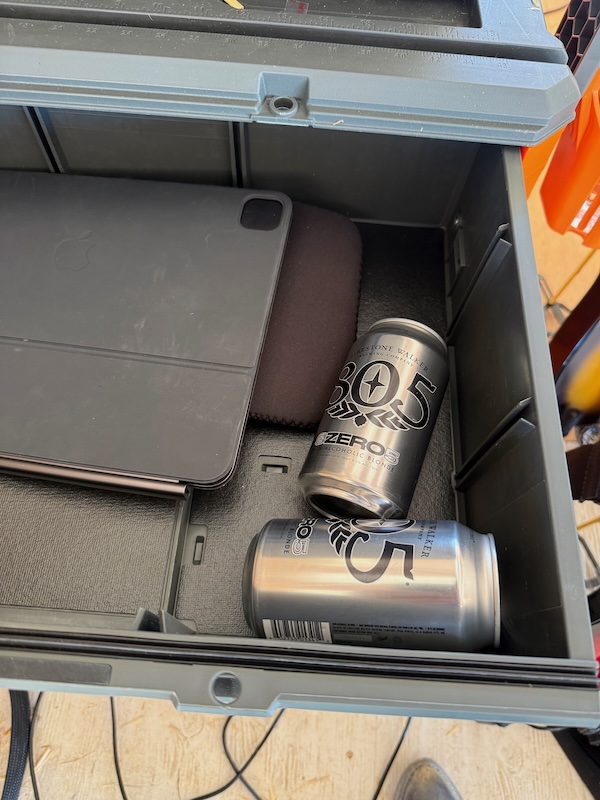
So now I have to decide whether to try to replicate the issue and track down the culprit, or just prophylactically clean and/or replace every cable in the chain and hope that fixes it. The latter would be A) a lot of work, and B) not reassuring because I didn’t find the root cause. So since I don’t have a gig with it for a couple weeks, I’m going to try to replicate the issue. But do I clean the dust off everything or try to replicate the issue with it as dirty as it got on stage? I think I’ll clean it. That much dust won’t do any of the equipment any favors.
Just finished cleaning everything, now I’m too tired to start troubleshooting. Maybe later. Well, that's not entirely true. Determined it was the cable from the Amp Out jack to the jack box in the top drawer that was getting caught somewhere in the back behind the drawers and preventing it from closing. And sometimes it would get stuck between the top edge of the drawer and the toolbox and keep it from opening all the way. But if you pull out both drawers and close them, it resolves. Might have made that cable just a bit too long, may have to shorten it one of these days. Update: I shortened it, it works like it should now.
Troubleshooting
October 19, 2026
Last night I plugged everything back in and set it all up, but it was a bit late to be making noise, so I opted to wait until this morning to turn it on. And when I did, hoo-boy. No power to th USB ports, so no monitor and no clock, no power to the footswitches and LEDs, no sound coming out of the VG-800, and, well, that was enough to start with. Figured I'd tackle the USB power. The problem: there wasn't any. Tested all the cables, they seemed to work like I wanted them to, but nothing powered by USB from the Fender Engine Room was getting power. Checked the power from the 12V ports, no power there. Pushed a button on the Voodoo Lab Control Switcher, nothing happened. The only things on were the VG, the GM, and the video switcher, and on the floorboard, just the MC-8 Pro and the two Luminites. They get power from separate power supplies. Oh, no, did I overload and fry the Fender power supply? Hope not. Did it suck up too much dust and short out? Really hope not. Did the IEC plug come out of the back of it so it didn't get any AC power? Let me reach in and push on it...yes, that was it. Once that got re-seated, everything came back to life. Whew, that's a relief. But now I have to find a better way to secure that plug, I see some long zip-ties in its future.
Now that I have that taken care of, let's see if we can find the intermittent volume-drop issue. Pulled out the same PRS guitar I used on Saturday and strummed a chord. Nothing. Hmm, did the switch on the GK pickup get moved to somewhere other than the middle? Yes. OK, that's an easy fix. Played through it and everything sounded nice, albeit way out of tune. Those PRS tuners don't hold a tune in the gig bag, they are easily bumped. OK, let's tune it up. E-A-D-G-B-uh oh. No signal from the high E string. Checked the cable (an inexpensive, recently-purchased one from eBay, when will I ever learn?), it made a lot of noise whenever I touched the connector at the guitar end. Moving the cable around while it was plugged in produced even more noise. OK, try another cable (I bought 2, not making this mistake again). Same problem. Hmm, try another guitar. It worked fine. OK, something in the pickup. Go back to the PRS and start with the moving parts: spray De-Ox-It into the jack and work the plug in and out of it a few times. 6 strings once again! Probably picked up even more dust at Saturday's gig than I'd thought. On to the volume-drop issue. Just started playing through some songs, and before long, it happened. OK, while it's happening, wiggle some cords. Speaker cable? That's not it. GK cable? Nope. Jack box inside the top drawer that patches through to the amp? Bingo. Wiggling the cable that goes into that box yields either reduced volume or a complete mute. Technically an easy fix, but logistically, well, that assembly will have to come out of there and get looked at. Should I just put a plug on it and use a 1/4" coupler? Thinking about it. But it'll have to wait until after lunch. Also need to figure out why the drawer won't open all the way without yanking on it. I suspect the issues are related.
Well, they were sort of related. The drawer was getting stuck while opening because too much of the AC cord for the amp had slid back through the hole in the back of the top drawer and was clogging things up back there. Fixed that by measuring how much it would need at most, and zip-tying the rest to the drawer bottom behind the amp head. Decided to keep it somewhat modular for the amp and removed the jack box, and replaced it with a 1/4" F-F shielded coupler. That meant soldering a plug onto the end of the cable that used to go into the jack box, but that wasn't hard. That cable, too, was longer than it needed to be, so I measured its maximum required length and cut it to fit, soldered the jack on, and tested it out. All good (yay!). Played through it for quite a while and the volume issue never returned. Hopefully it won't but time will tell. Looked at ways of securing the IEC cable into the back of the Fender Engine Room, and while it can be done, I'm going to have to pull out a few components to do it, and I decided today wasn't going to be the day for that. Shoved it in as tight as it would go, and will see if it stays put for a while. If not, or if I get some spare time, I'll do the needful. Here is the AC cord secured down along with the input cable with the new coupler, also zip-tied down to the bottom of the drawer:
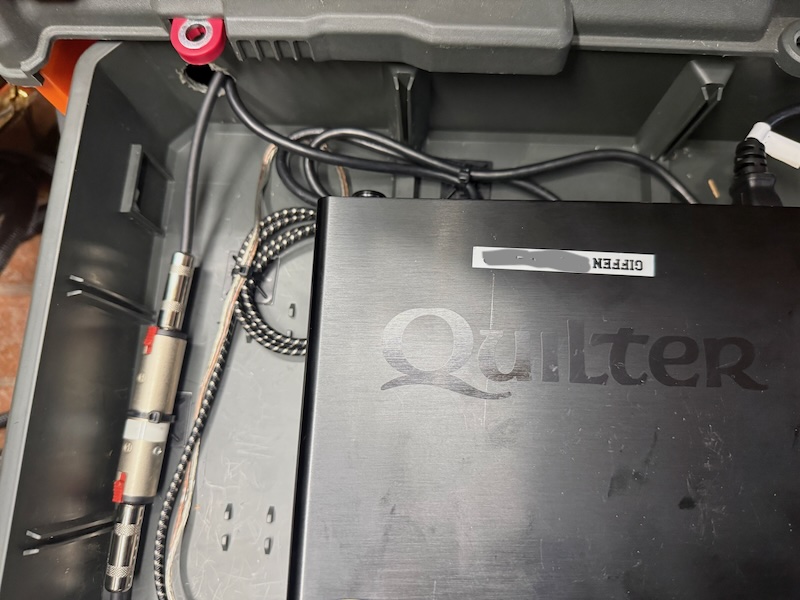
Hopefully, it's smooth sailing from here on out. I'll let you know.
More Troubleshooting
Well, of course something else had to screw up. I got another Luminite EC Controller (to control the volume levels of the VG- and GM-800s wirelessly from my guitar) and needed to pair it with the Graviton M1. So I turned everything on and...practically non-existent volume from the VG-800, but consistently this time. And the GM-800 sounded fine, except for certain strings. This made little sense, so I unplugged the GKC-13 cable from the Primova subsonic filter and re-seated it (since it gets jostled the most at the moment with the opening and closing of drawers). Problem cleared up. More dust probably got into the connector, time for more De-Ox-It. But it works fine now, so I'm still a happy camper. Got the EC Controller paired and configured, all good now. But no gigs for a while, but that's OK. My GK pass-thru made it from Australia to New York to Los Angeles, so I should have it in a day or two. Then it will finally be complete. Until I think of something else I want to do with it. Still considering adding a phone/iPad charger, which I used to have on the big Pedaltrain board. Thought of a way to do it, but haven't reached a decision yet.
Completion, Well, Mostly
Today I got my much-needed panel-mount pass-through GK13 harness and mounted it in the toolbox. Once again, major shout-out to Peter at Synth-Linx for making it and getting it to me. And installation was almost painless. The only surprise was discovering that I hadn't factored in how much room the plug needed once it was plugged into the Primova subsonic filter. And it needed more than I'd given it, so something needed to change. Thankfully, it wasn't all that hard to rotate the Primova box 90 degrees and stick it to something else. Once that was done, a couple of holes, some screwdriver work, and it was done. Made a label for it and stuck it on there, tested to make sure the cable goes in it, and it does, so all I need to do is plug everything else back in and try it out. But it's too late for that at the moment, so I'll just write about it.
Here are some pictures: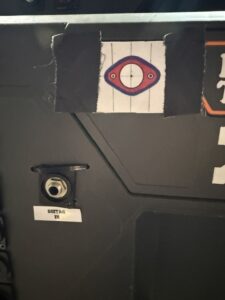 Ready to drill
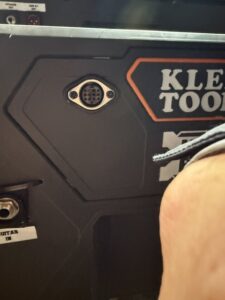
Mounted
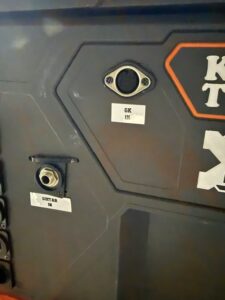
Labeled
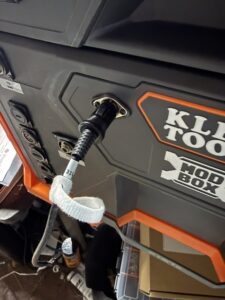
Plugged in
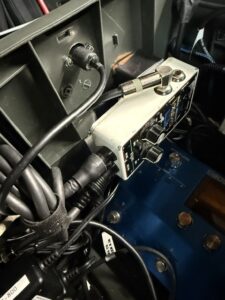
View from the inside
Hey, What About...
I said to myself "It's finally done!" and then started thinking about what I could add. And the first thing that came to mind was a panel-mount USB port, or maybe two, for charging my phone, or my iPad, or one or two of my EC controllers. There's room in the top drawer for an IEC splitter cable, a USB charger, and I can just put it off to the right on the front of the drawer. Just need a couple of parts, and they'll be here tomorrow, so until then, we're done.
Most of the parts got here, I'll be using a different charger, but it's not here yet, so I'm making do with a charger I already had. And now, aside from swapping out the USB charger, it's really done.
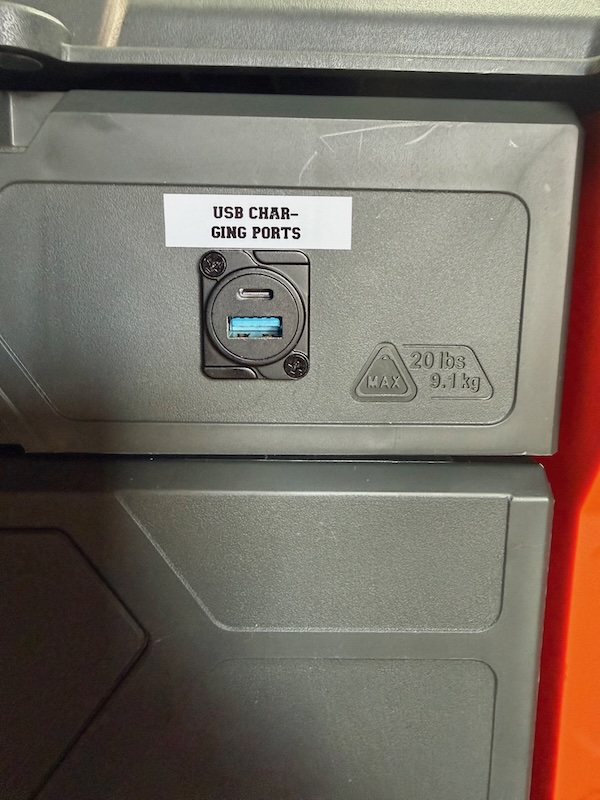
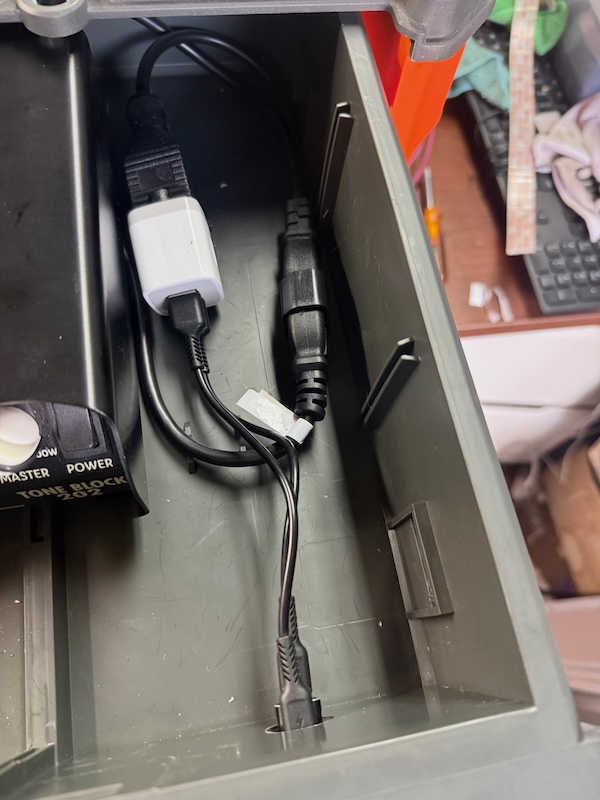
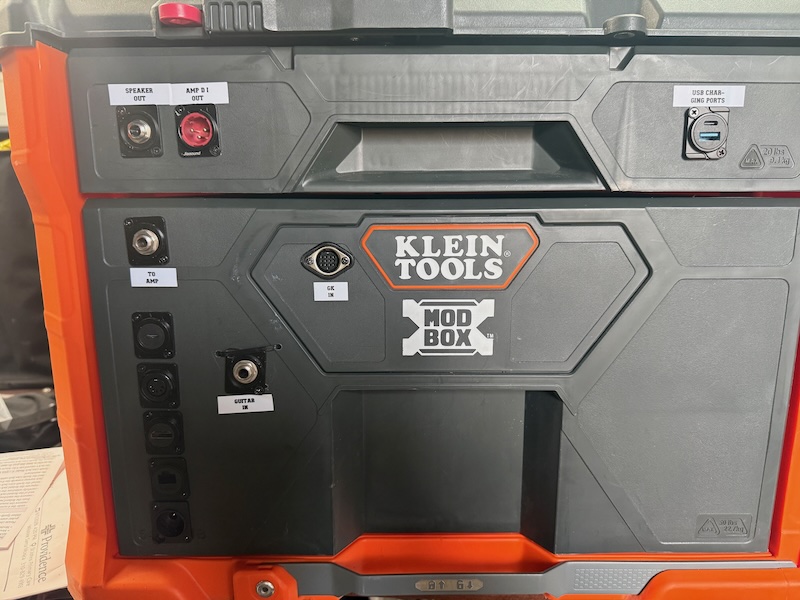
Decided to go all-in on the USB charging ports and have four of them instead of two:
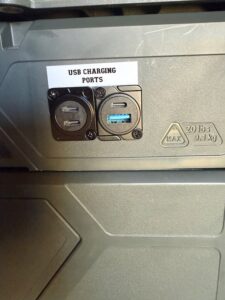
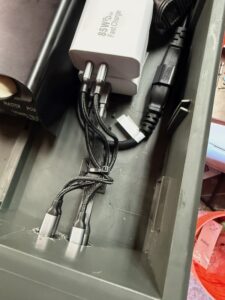
I think now it might actually be "done." Though I'm considering adding a USB hub inside the bottom drawer with cables connected to the GM- and VG-800, with yet another pass-through jack on the front to facilitate programming the devices.